
Best Grammarly Alternatives for Non-Native English Speakers (2026)

Grammarly is the default writing assistant for millions of people — and for catching grammar and spelling mistakes, it's excellent. But if you're a non-native English speaker, you've probably noticed it doesn't fix the deeper problem: even with zero errors, your text still reads non-native. Here are five alternatives — what each does best, where it falls short, and which to pick.
Disclosure: Limato is our product. We've tried to keep this comparison honest — every tool below has real strengths, and the right pick depends on what you're actually trying to fix. Pricing reflects publicly listed monthly-billed plans as of June 2026; annual billing is typically much cheaper across all tools.
Why people look for a Grammarly alternative
Grammarly does one thing extremely well: catch errors. Grammar, spelling, punctuation, and a layer of clarity and tone suggestions on top. For native speakers who just want a safety net, that's often enough.
The most common reasons we hear from non-native users switching:
- It polishes, it doesn't rewrite. Grammarly fixes what's wrong. It won't strip the patterns that make writing sound non-native — stiff openers ("I hope this email finds you well"), over-hedging, literal translations, mechanical sentence rhythm. The grammar is perfect; the text still sounds foreign.
- Price. Grammarly Pro runs $30/mo. For an individual who mainly wants better phrasing, that's a lot next to tools at a third of the price.
- Limited, paywalled translation. Many non-native writers think in their first language. Grammarly added translation across 15 languages, but only on paid plans. Limato translates 34 languages bidirectionally on the free tier, in the same popup as the rewrite.
What "non-native" actually looks like
Before comparing tools, look at the problem. Below is a real-world ESL email opener — the kind of paragraph a fluent-but-non-native writer produces every day. Then the same text after Grammarly's strongest clarity pass, and after a native-tone rewrite.
I hope this email finds you well. I am writing to you in order to kindly ask about the possibility of scheduling a short call regarding the project we have discussed previously. As I have mentioned in our last conversation, I would really appreciate if we could find a time that works for both of us in order to align on the next steps.
Methodology: Grammarly has no "Native" mode, so we ran its closest equivalent — the Clarity suggestions on the Review tab — against a native-tone rewrite. Single run, default settings, no cherry-picking.
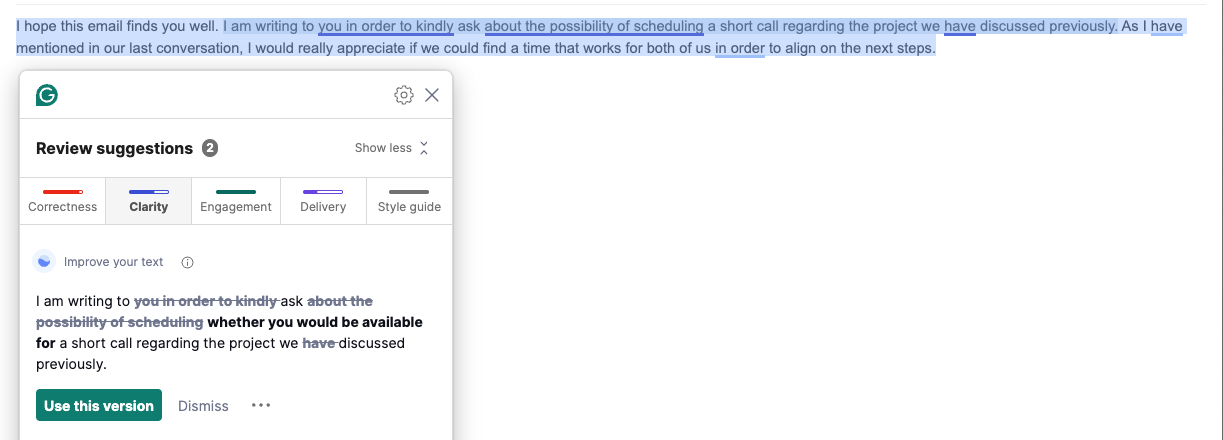
I hope this email finds you well. I am writing to ask whether you would be available for a short call regarding the project we discussed previously. As I have mentioned in our last conversation, I would really appreciate if we could find a time that works for both of us in order to align on the next steps.
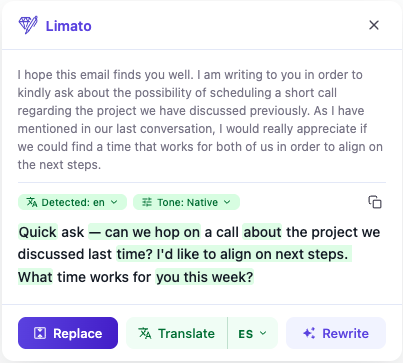
Quick ask — can we hop on a call about the project we discussed last time? I'd like to align on next steps. What time works for you this week?
Same input, two very different jobs. Grammarly cleans the surface and keeps the ESL scaffold intact (−8%). A native-tone rewrite restructures: drops the stiff opener, cuts the hedges, halves the length (−55%) without inventing anything. That's the gap most non-native writers actually need closed. For the Grammarly deep dive, see Limato vs Grammarly; for QuillBot, Wordtune, and DeepL Write on the same email, see our paraphraser comparison.
How they compare
| Tool | Output length | Real rewrite? | Best for | Pricing |
|---|---|---|---|---|
| Limato | −55% | Yes | Non-native → native rewrites, tone variation | Free + $5.99/mo |
| Grammarly (Clarity) | −8% | No | Grammar + spelling, error-catching | Free + $30/mo |
| LanguageTool | n/a | No | Free grammar, privacy / self-hosting | Free + $24.90/mo |
| QuillBot (Fluency) | −23% | Partial | Paraphrasing, students | Free + $19.95/mo |
| Wordtune (Casual) | −23% | Partial | Tone variation, brainstorming | Free + $19.99/mo |
| DeepL Write | n/a | — | Clarity rewrites, EU languages | Free + $10.49/mo |
1. Limato — the native-tone rewriter for ESL writers
Best for: sounding like a native speaker
Limato is built around a single insight: non-native writing has recognizable patterns — formal openers, over-hedging, literal translations, missing articles, mechanical sentence rhythm — and a grammar checker doesn't fix any of them. It removes mistakes, not foreignness.
Highlight any text in Gmail, LinkedIn, Notion, Slack, or anywhere else you type, pick "Native" tone, and Limato rewrites it the way a fluent English speaker would — a measured median 37% shorter, with the ESL signals stripped out. There's also a translation mode across 34 major languages → idiomatic English. See the full breakdown in Limato vs Grammarly.
- Aggressive native rewrite, not just error-fixing
- Inline on any webpage — no copy-paste
- One-fifth the price of Grammarly Pro
- Built for non-native speakers specifically
- Chrome only (Firefox/Safari coming)
- No long-form document editor
- Not a dedicated grammar checker — it rewrites
2. LanguageTool — the free grammar alternative
Best for: free grammar checking, privacy, self-hosting
LanguageTool is the closest like-for-like Grammarly alternative: a multilingual grammar and style checker with a strong free tier. Its standout feature is that it's open-source and can be self-hosted — your text never leaves your own server. It supports 30+ languages, which makes it a favorite of multilingual writers.
- Best free grammar tier in this list
- Self-hostable — strongest privacy story
- 30+ languages checked
- Like Grammarly, it fixes errors — won't make you sound native
- Style suggestions are lighter than Grammarly's
- No real rewrite or translation mode
3. QuillBot — the paraphrase classic
Best for: students, paraphrasing, source rewrites
QuillBot is the original paraphrase tool, and a real step up from Grammarly if you want the text actually reworded rather than just corrected. Multiple modes — Standard, Fluency, Formal, Creative, Shorten — and a generous free tier. Its Fluency mode cuts about 23% and reads cleaner, though the register tends to come out mixed. See Limato vs QuillBot for the same-email test.
- Best free tier for paraphrasing
- Multiple rewrite modes
- Built-in summarizer and citation tools
- Mixed register — formal verbs next to casual idiom
- No specific "native speaker" rewrite
- Free tier word cap interrupts flow
4. Wordtune — sentence-level rephrasing
Best for: tone variation, brainstorming phrasings
Wordtune takes a sentence and gives you several rephrased versions to pick from, in tones like Casual and Formal. Useful when you're stuck on one line. Less useful for a whole stiff email — and in our testing its "Casual" tone still read formal, and the default suggestion sometimes added phrases not in the source. Details in Limato vs Wordtune.
- Multiple rephrasings per sentence
- Good for breaking out of a phrasing rut
- Clean inline UI
- Sentence-by-sentence flow is tedious for full emails
- Tone labels don't always match the output
- Pricier than Limato, no true native mode
5. DeepL Write — clarity rewrites for European writers
Best for: EU-language writers, clarity-focused edits
DeepL Write is the rewrite tool from the team behind the DeepL translator — a model many non-native speakers already trust. Strong on clarity and fluency, especially for German, French, Spanish, and other European-language speakers writing in English. It pairs naturally with DeepL's translator, but its rewrites are conservative — it won't aggressively de-ESL your text. Compared head-to-head in Limato vs DeepL Write.
- Excellent prose quality, especially for EU languages
- Pairs well with DeepL Translator
- Clean, distraction-free interface
- Web-app first — inline experience weaker than Limato or Grammarly
- Conservative tone — won't aggressively de-ESL your text
- Limited writing tones / modes
How to pick
Cut through the feature lists with one question — what are you actually trying to fix?
- "My English sounds non-native" → Limato. Built for exactly this.
- "I want Grammarly-style grammar checking, for free" → LanguageTool.
- "I need to paraphrase source material" → QuillBot.
- "I want a few phrasings for one sentence" → Wordtune.
- "I write in EU languages and want a clarity rewrite" → DeepL Write.
Grammarly is still a great safety net — if your main worry is "did I make a mistake?", its free tier is hard to beat. But "is this correct?" and "does this sound native?" are different questions. Grammarly answers the first. For the second, you need a tool that restructures, not one that polishes.
Want to see the same comparison from the other side? We also ranked the best Wordtune alternatives. And if you want to understand the patterns these tools are (or aren't) catching, read our guide on English writing tips for non-native speakers — eight specific habits that mark ESL writing.
Starting from an AI draft instead of your own? Grammar checkers won't remove AI tells. Run it through the free AI humanizer first — there are dedicated pages for ChatGPT, Copilot, and DeepSeek output.
Try Limato — rewrite like a native
Chrome extension. Highlight any text, pick a tone, get a native-sounding rewrite in one click. Free to try.
Add to Chrome →Frequently asked questions
What is the best free Grammarly alternative?
For grammar checking, LanguageTool has the strongest free tier and can even be self-hosted for privacy. For rewriting rather than error-fixing, Limato offers a free tier focused on native-tone rewrites inside any browser tab, and QuillBot has a generous free paraphrasing tier (up to 125 words per rewrite). Pick by job: LanguageTool to catch mistakes for free, Limato to actually sound native.
Is Limato better than Grammarly for non-native English speakers?
For sounding native, yes. Grammarly fixes grammar, spelling, and punctuation but leaves non-native phrasing intact — stiff openers, over-hedging, literal translations. Limato's "Native" tone restructures the text the way a fluent speaker would write it, a measured median 37 percent shorter across 40 drafts, and it costs $5.99/mo versus Grammarly Pro at $30/mo. If your only goal is catching typos and grammar errors, Grammarly's free tier is still excellent.
Why are people looking for a Grammarly alternative?
Three common reasons: price (Grammarly Pro runs $30/mo, steep for individuals), the fact that it polishes rather than rewrites — so non-native text stays non-native — and the lack of translation or a true native-rewrite mode for ESL writers. Privacy-conscious users also look for tools like LanguageTool that can be self-hosted.
Does Grammarly make you sound like a native speaker?
Not really. Grammarly corrects errors and trims minor wordiness, but it keeps the underlying sentence structure. A non-native opener like "I hope this email finds you well. I am writing to kindly ask..." stays a stiff, formal scaffold after Grammarly — it just has fewer mistakes. Sounding native requires restructuring, which is what a native-tone rewriter like Limato does.