
Limato vs DeepL Write: which rewriter for non-native English speakers? (2026)

DeepL Write Simple style trims an ESL email by 17% and casualizes the register — and in our run added "and day", a phrase that wasn't in our source. Limato Native cut 55% with zero hallucinations. Same input, two tools, side-by-side below.
Disclosure: Limato is our product. Both screenshots are from real runs on the same email — DeepL Write Simple style explicitly selected (web app); Limato Native tone (Chrome extension). Pricing reflects publicly listed plans as of May 2026.
The short version
DeepL Write rewrites in styles. Polish-and-recast tool from the team behind DeepL Translator — Simple drops formal register, Business preserves it, Casual goes further. Default mode (no style) is conservative (~6% trim). Strong on European languages. Web app first; Chrome / Edge / Firefox extension and desktop apps mostly mirror the web flow.
Limato rewrites for native tone. Restructure the sentence, drop ESL openers, cut hedges. One rewrite on the selection — a measured median 37% shorter. Works for any of 34 target languages, not just English.
They share an ESL audience but solve different jobs. DeepL keeps your scaffold and casualizes the register; Limato drops the scaffold. Which one fits depends on how aggressive a rewrite you want.
Limato Pro: $5.99/mo monthly OR $47.99/yr (~$4/mo). DeepL Pro Starter: $10.49/mo annual-billed ($125.88/yr, bundles translator). Annual to annual: $48 vs $126 — Limato 2.6× cheaper. Free tier: Limato 20/day (~800 words/rewrite); DeepL 1,500 chars/rewrite (~250 words), limited tone access.
Same email, two tools
Below is a real ESL email opener and the output each tool produced on its strongest equivalent mode — DeepL Write's Simple style and Limato's Native tone.
I hope this email finds you well. I am writing to you in order to kindly ask about the possibility of scheduling a short call regarding the project we have discussed previously. As I have mentioned in our last conversation, I would really appreciate if we could find a time that works for both of us in order to align on the next steps.
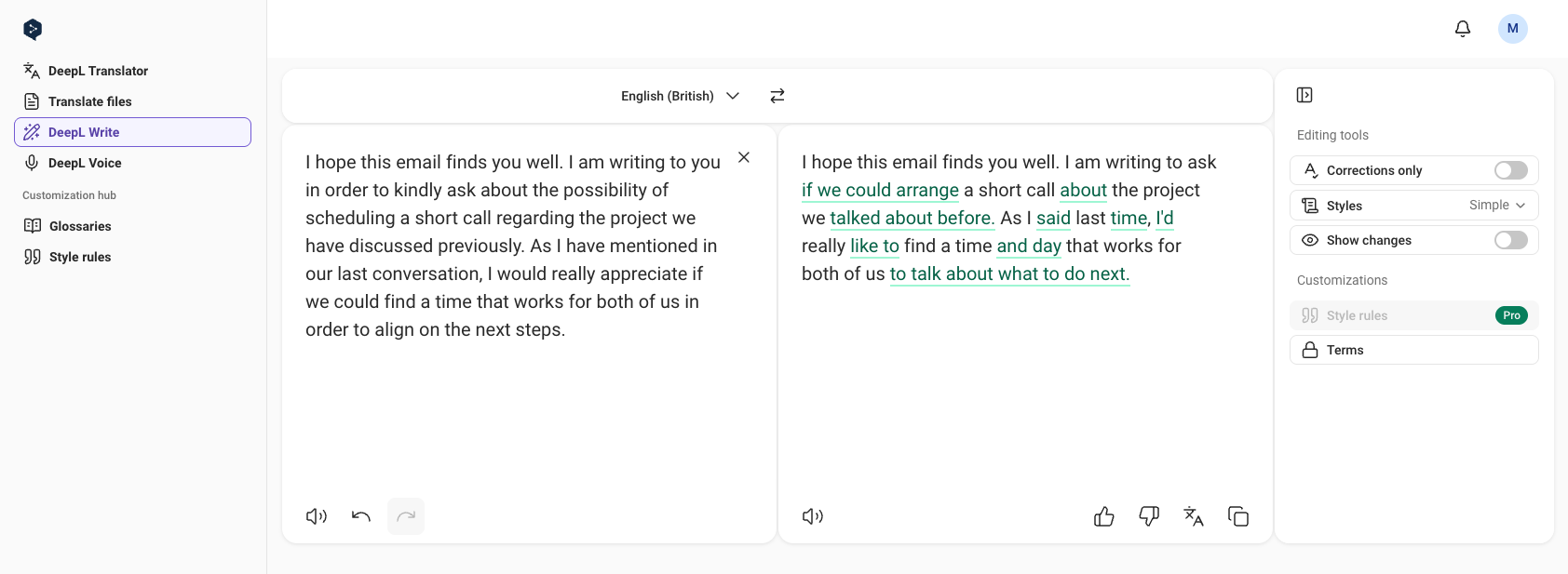
I hope this email finds you well. I am writing to ask if we could arrange a short call about the project we talked about before. As I said last time, I'd really like to find a time and day that works for both of us to talk about what to do next.
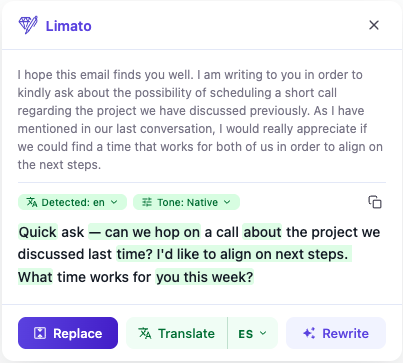
Quick ask — can we hop on a call about the project we discussed last time? I'd like to align on next steps. What time works for you this week?
DeepL Write Simple trims ~17% and casualizes the register without changing the shape of the email — and in our run added "and day" (not in the source). Limato Native trims ~55% and restructures cleanly. Methodology: DeepL Write Simple style explicitly selected; default mode (no style) returned a more conservative trim (~6%). Limato Native single run, default settings.
See it on your own text → Free, 20 rewrites/day, no card.
Add to ChromeHead-to-head
| DeepL Write | Limato | |
|---|---|---|
| Primary job | Polish or recast (style-dependent) | Aggressive native-tone rewrite |
| Output on ESL email | −17% length (Simple style), scaffold intact, register casualized | −55% length, restructured |
| Styles / tones | 4 styles (Simple, Business, Academic, Casual) + 3 tones (Enthusiastic, Friendly, Confident) | 7 explicit tones (native, formal, casual, simplify, academic, grammar, humanize) |
| Where it runs | Web app first, Chrome / Edge / Firefox extension, desktop apps | Chrome extension, popup on selection |
| Rewrite languages | 8 (EN-US, EN-UK, DE, FR, ES, IT, PT, ZH-CN) | 34 languages (rewrite + translate, same popup) |
| Translation | DeepL Translator — 30+ languages, separate tool | 34 languages, bidirectional, same popup as rewrite |
| Free tier | 1,500 characters / rewrite | 20 rewrites/day, up to ~800 words per rewrite |
| Paid plan (monthly) | $10.49/mo (Pro Starter, annual-billed) | $5.99/mo (monthly) or ~$4/mo (annual) |
| Paid plan (annual) | $125.88/yr (Pro Starter) | $47.99/yr (~2.6× cheaper) |
When to pick each
Pick DeepL Write when…
- You're a European-language speaker (German, French, Spanish, Italian, Portuguese) writing in English.
- You already trust DeepL Translator and want the same engineering rewriting your prose.
- You want a light polish (default mode) or register adjustment (Business / Academic / Simple styles).
- You write longer-form content (reports, proposals) in a web-app editor view.
- You want one subscription bundling translate + rewrite from DeepL.
Pick Limato when…
- Your English is grammatically correct but still reads non-native.
- You want an aggressive restructure, not a polish.
- You write in Gmail, LinkedIn, Slack, Notion — short messages, not documents.
- You want the rewrite and translation in the same inline popup, across 34 languages.
- You don't want to switch to a web app to rephrase a 50-word message.
They can coexist. A natural split: DeepL Write for documents and longer-form work in its editor, Limato for inline daily writing. They don't conflict in Chrome.
The one-line rule
Ask yourself which sentence is more often true:
- "I want a light polish or register adjustment." → DeepL Write.
- "I want a rewrite that doesn't read ESL." → Limato.
DeepL earned its reputation on translation. DeepL Write extends that pedigree to rewriting. Limato takes a different stance: most non-native writing problems aren't about word choice or register, they're about structure — and structure needs a rewrite, not a recast.
Try Limato — rewrite like a native
Chrome extension. Highlight any text, pick a tone, get a native-sounding rewrite. Free, 20 rewrites/day, no card.
Add to Chrome →Frequently asked questions
Is Limato a DeepL Write replacement?
For non-native English writers who want a more aggressive rewrite, yes. DeepL Write paraphrases by style — Simple casualizes the register, Business preserves it, default polishes lightly. None restructure. Limato Native restructures: drops stiff openers, cuts ESL hedges, halves the length on average. If you trust DeepL's translator and want the same engineering team rewriting your text in a clean web app, keep DeepL Write. If you want a one-click inline rewrite that sounds native rather than polished, Limato fits better.
Does DeepL Write work for non-native English speakers?
Yes — especially for European-language speakers writing in English. DeepL Write has a reputation for high prose quality and pairs naturally with the DeepL Translator most ESL writers already use. On the same email we tested across our other versus pieces, DeepL Write Simple style trims around 17% and casualizes the register — formal phrases ("regarding", "align on the next steps") become more conversational ("about", "talk about what to do next"). It recasts; it doesn't restructure. Limato Native trims around 55% by restructuring.
Limato vs DeepL Write — what's the pricing difference?
DeepL has a free tier (1,500-character limit per rewrite, ~250 words) and DeepL Pro Starter at $10.49/month annual-billed ($125.88/year, bundles the translator). Limato Pro is $5.99/month monthly or $47.99/year (~$4/month, 33% off). Annual to annual, Limato is 2.6× cheaper. Limato's free tier covers 20 native rewrites/day for signed-in users (5/day anonymous), with up to ~800 words per rewrite.
Can I use Limato and DeepL Write together?
Yes — they don't conflict. A reasonable workflow: use DeepL Write inside its web app for longer documents where you want polish or register adjustment, and Limato for short inline writing — Gmail, Slack, LinkedIn — where you want a fast native-tone rewrite without opening a separate tab. They cover different cadences.
Does DeepL Write support translation like Limato?
Yes — DeepL Translator covers 30+ languages and is what most ESL writers already use. But DeepL Write itself supports rewriting in 8 languages (English US/UK, German, French, Spanish, Italian, Portuguese, Simplified Chinese). Limato rewrites and translates in 34 languages bidirectionally from the same popup, on the free tier. Pick DeepL if you specifically want DeepL's translation pedigree and the 8-language rewrite set covers you; pick Limato for broader language coverage in a single inline tool.