
Limato vs Grammarly: which rewriter for non-native English speakers? (2026)

Grammarly trims 8% of your ESL email and keeps the stiff opener. Limato trims 55% and rewrites it the way a native colleague would. Same input, two tools, one search query — here's the side-by-side and a one-line rule for picking.
Disclosure: Limato is our product. Both screenshots are from real runs on the same email, default settings. Pricing reflects publicly listed plans as of May 2026.
The short version
Grammarly fixes mistakes. Missing commas, wrong tenses, awkward word choice. It nudges the surface of your text without changing how it's structured.
Limato rewrites for native tone. It takes a stiff non-native paragraph and returns the version a fluent speaker would have written — a measured median 37% shorter, with the formal openers, hedging, and literal translations stripped out. Works for any of 34 target languages, not just English.
They're not competitors so much as different layers. The answer to "Limato vs Grammarly" is usually "both, for different jobs." If you only get one, pick the one that solves your more urgent job — rule at the bottom.
Limato Pro: $5.99/mo or $47.99/yr (~$4/mo). Grammarly Pro: $30/mo, $12/mo annual. Monthly: 5× the price for the wrong job. Annual: $144 vs $48 — 3× more for editing long documents you may not need. Limato free tier covers 20 rewrites/day. Plus a Grammar tone if you need basic fixes too.
Same email, two tools
Below is a real ESL email opener and the output each tool produced on its strongest equivalent mode — Grammarly's Clarity tab and Limato's Native tone. Single run, default settings, no cherry-picking.
I hope this email finds you well. I am writing to you in order to kindly ask about the possibility of scheduling a short call regarding the project we have discussed previously. As I have mentioned in our last conversation, I would really appreciate if we could find a time that works for both of us in order to align on the next steps.
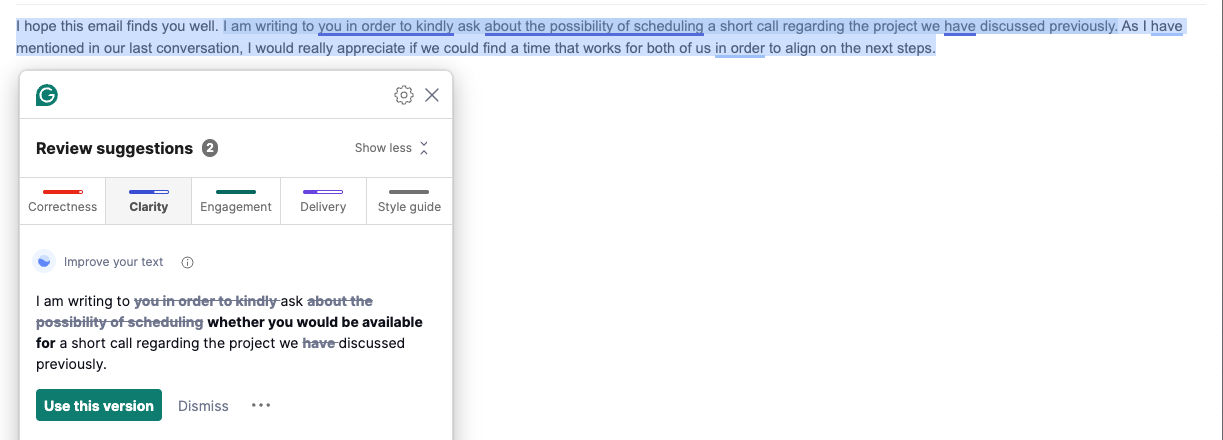
I hope this email finds you well. I am writing to ask whether you would be available for a short call regarding the project we discussed previously. As I have mentioned in our last conversation, I would really appreciate if we could find a time that works for both of us in order to align on the next steps.
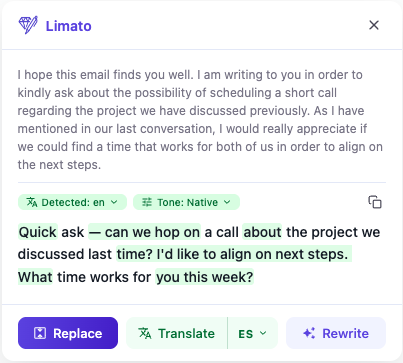
Quick ask — can we hop on a call about the project we discussed last time? I'd like to align on next steps. What time works for you this week?
Tested on the email above; the same pattern repeats across our internal trials. Grammarly trims 5–10% and keeps the structure; Limato Native trims a median 37% (measured across 40 drafts) and replaces it. Same source, two different jobs.
See it on your own text → Free, 20 rewrites/day, no card.
Add to ChromeHead-to-head
| Grammarly | Limato | |
|---|---|---|
| Primary job | Fix grammar, spelling, clarity | Rewrite for native tone |
| Output on ESL email | −8% length, scaffold intact | −55% length, restructured |
| Tones / modes | Tone detection (free+); Brand Tones / style guide (Business) | 7 explicit tones (native, formal, casual, simplify, academic, grammar, humanize) |
| Inline on any site | Yes (browser extension, broad coverage) | Yes (Chrome extension, popup on selection) |
| Translation | 15 languages (19 locale variants), bidirectional, Pro+ only | 34 languages, bidirectional, free tier included |
| Long-form editor | Yes (web app, desktop, Word, Docs) | No (inline only) |
| Free tier | Basic grammar / spelling | 20 native rewrites/day (signed-in) |
| Paid plan (monthly) | $30/mo | $5.99/mo |
| Paid plan (annual) | $144/yr ($12/mo) | $47.99/yr (~$4/mo) |
When to pick each
Pick Grammarly when…
- You make grammar and spelling mistakes you can't catch.
- You write long documents (reports, theses, manuscripts) and need an editor view.
- You want plagiarism checking, citation help, or AI detector tools in one place.
- You write across Word, Google Docs, and desktop apps and want one tool covering all.
- Your team needs brand-voice guardrails (Grammarly Business).
Pick Limato when…
- Your English is grammatically correct but still reads non-native.
- You write in Gmail, LinkedIn, Slack, Notion — short messages, not documents.
- You sometimes draft in your first language and want native English in one step.
- You want sharper tone control — explicit "Native", "Casual", "Formal", "Simplify", "Humanize", "Grammar", "Academic".
- Editor-style writing isn't where your problem lives.
If both jobs are urgent — you make errors and your text reads non-native — run them together. They don't conflict in Chrome, and they layer naturally: Grammarly cleans the surface as you type, Limato restructures the paragraph on selection.
The one-line rule
Ask yourself which sentence is more often true:
- "My English has mistakes." → Grammarly.
- "My English is technically correct but sounds off." → Limato.
Most non-native writers past intermediate level live in the second sentence. Grammar mistakes become rare; the residual problem is rhythm, register, and structure — and that's the gap Limato is built for.
Try Limato — rewrite like a native
Chrome extension. Highlight any text, pick a tone, get a native-sounding rewrite in one click. Free, 20 rewrites/day, no card.
Add to Chrome →Frequently asked questions
Is Limato a Grammarly replacement?
Only partially. Grammarly fixes grammar, spelling, and punctuation errors as you type, across whole documents. Limato rewrites sentences to sound native — it doesn't flag a missing comma, it rewrites the whole sentence. Limato also has a Grammar tone for one-shot fixes on a selection if you want basic mistake-catching without a second tool. If your main concern is "did I make a mistake?" keep Grammarly. If your concern is "does this read non-native?" Limato solves that better. Many ESL writers use both.
Does Grammarly fix non-native English?
Grammarly catches grammar errors, missing articles, and basic clarity issues, but it preserves the underlying ESL structure — stiff openers, over-hedging, formal scaffolding, and literal translations. In our side-by-side test on the same email, Grammarly Clarity cut 8% of the length and kept the non-native rhythm intact. Limato Native cut 55% and restructured the message.
Limato vs Grammarly — what's the pricing difference?
Grammarly Pro is $30/month billed monthly ($12/month if billed annually, $144/year). Limato Pro is $5.99/month or $47.99/year (~$4/month, 33% off). At annual billing the gap is $144 vs $48 — Grammarly costs 3× more even on its cheapest tier. Both have a free tier. Grammarly's free tier covers basic grammar and spelling. Limato's free tier covers 20 native-tone rewrites per day for signed-in users (5 per day anonymous).
Can I use Limato and Grammarly together?
Yes — they run side by side in Chrome without conflict. They solve different jobs: Grammarly flags errors as you type; Limato rewrites a selection on demand. A common workflow is to type freely, let Grammarly clean the surface, then select the paragraph and ask Limato for a native-tone rewrite.
Does Grammarly support translation like Limato?
Yes — Grammarly added paragraph-level translation across 15 languages and 19 locale variants (Chinese Simplified, Dutch, English British/American, French, German, Indonesian, Italian, Japanese, Korean, Polish, Portuguese and Brazilian Portuguese, Spanish and Argentinian/Mexican Spanish, Swedish, Turkish, Ukrainian — both directions), on Pro+ plans. Limato translates 34 languages bidirectionally on the free tier, in the same popup as the native-tone rewrite — Native tone works in any of the 34 target languages, not just English. Grammarly wins if you already pay $30/mo and the 15-language set covers you; Limato wins on a wider language set without the paywall.